Your WordPress blog, in your store subfolder.
Stop running your blog on a separate subdomain. Post Bridge serves your existing WordPress posts from a subfolder on your Shopify store domain, so the SEO you earn builds up on the domain that actually sells your products.
$25 a month after the trial. Cancel from Shopify any time.
- Keeps your WordPress setup
- About a minute to set up
- One domain for SEO
Shopify stores running their blog on Post Bridge
- Cafe Planta
- R-PUR
- ePackageSupply
- @SEOUL
- Woofini
- Juice Press
- Independence Brothers
The problem
A subdomain blog is SEO work you don’t get paid for.
You publish, you earn links, you climb rankings, and all of it lands onblog.yourstore.com, a site search engines judge largely on its own. Your product pages get very little of it. Shopify’s built-in blog is the usual escape hatch, but it means giving up the WordPress editor, your plugins and years of content. Post Bridge is the third option. Keep WordPress, move the address.
Subdomain blog
2 sitesJudged separately. Links earned here mostly stay here.
With Post Bridge
1 siteEvery post feeds the same domain your products rank on.
Same posts, same WordPress install. The only thing that changes is which domain builds up the authority.
- Authority stops leaking
- Every link your posts earn on a subdomain builds a site that is not your store. From a subfolder, that same link value flows into the domain selling your products.
- Nothing to rewrite
- You are not migrating a CMS or re-publishing archives. The posts you already have simply start answering on a new address.
- Not a re-platform project
- No theme code, no developer, no export job. Paste a URL into settings and save. One reviewer had it connected in two minutes.
What it does
Everything you need to run a blog on your store domain.
Your blog on your store domain
Point Post Bridge at your WordPress site and your posts are served from a subfolder on your store domain. Nothing is exported and nothing is copied over.
One domain for SEO
Search engines treat a subdomain as a separate site. A subfolder blog sends the same ranking signals back to the domain your products live on.
Matches your theme
Render posts inside your Shopify theme so the blog looks like the rest of your store. Or keep your WordPress design and serve it as it is.
Two proxy modes
Theme-matched mode wraps your content in your Shopify layout. Full-proxy mode serves your WordPress site untouched on your store domain.
Sitemaps and clean URLs
XML sitemaps and URL optimization mean crawlers find every post at the right address from the first day.
Keep what you already use
Same WordPress editor, same plugins, same authors, same workflow. Multi-language blogs work too.
How it works
Three steps, about a minute.
No theme code, no developer, no export job. Get your WordPress site reachable, hand Post Bridge the URL, save.
Post Bridge reads your posts from a WordPress site. A staging site works and so does a live one. All it needs is a URL it can reach.
Post Bridge only needs a URL it can reach.
Install the app, open settings, drop in your WordPress URL and pick a proxy mode. That is the entire configuration screen.
 Post BridgeShopify admin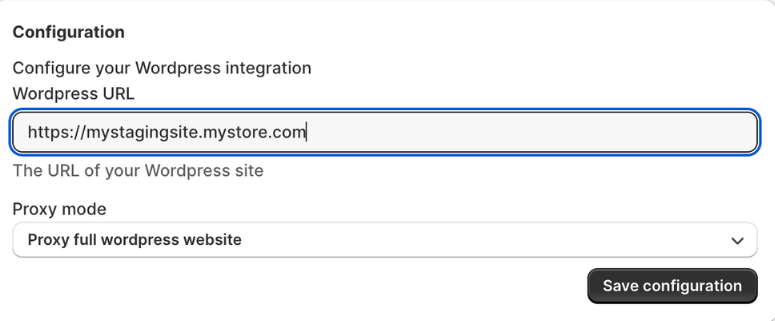
Your blog is now served from your store subfolder. Keep writing in WordPress exactly like you did before.
Same posts, now building SEO on your store domain.
Post Bridge only needs a URL it can reach.
Try it on your own store first.
The 7-day trial is free and you can cancel from Shopify any time.
Reviews
Merchants who moved their blog.
“Post Bridge is great! I was looking for a simple way to use a Wordpress Blog to publish on my Shopify store. And there weren’t very many good options. A friend of mine told me about Post Bridge and so far it’s been easy and smooth, our blog is already starting to drive traffic. The founder Naman is super helpful and responsive too.”
“Very good app, I was able to connect my Wordpress in two minutes! Great”
“Does exactly what we needed for our store, and got outstanding support from the creators of the app. Highly recommend!”
“This app is amazing! Shopify’s blog feature was really difficult to use, and I was able to solve this problem. Additionally, the post-purchase support was quick.”
“Really useful app with awesome support!”
Pricing
One plan. Everything included.
No per-post limits, no traffic tiers, no add-ons. Billed through Shopify alongside your other apps.
Pro
Everything Post Bridge does, for every store size.
USD
- Serve your WordPress blog from your store subfolder
- Both proxy modes, theme-matched or full WordPress
- Your WordPress setup stays exactly as it is
- XML sitemap and clean URLs
- Multi-language blogs
- Templates, import and export
- Unlimited posts and pageviews
- Email support from the team that built it
All charges are billed in USD. Recurring charges are billed every 30 days. Cancel anytime from your Shopify admin.
FAQ
Questions merchants ask first.
Why is a subfolder better than a subdomain?
Search engines mostly treat a subdomain like a separate website. Links and rankings your posts earn stay on that subdomain instead of lifting your product pages. Serving the same posts from a subfolder on your store domain keeps all of it in one place.
Do I have to move off WordPress?
No. That is the whole point. Your WordPress install stays where it is with the same editor, plugins, theme and workflow. Only the address your readers and Google see changes.
What path does my blog live at?
Post Bridge runs on the Shopify app proxy, so your blog is served from a proxy prefix on your store domain, for example yourstore.com/a/blog. You choose the last part of the path. What matters for SEO is that it sits on your store domain instead of a separate subdomain.
What is the difference between the two proxy modes?
Theme-matched mode renders your WordPress content inside your Shopify theme so the blog matches your store. Full-proxy mode serves your WordPress site as it is on your store domain. You can switch between them in settings.
Can I use a staging site instead of a public one?
Yes. A staging URL works just as well as a live one. The only requirement is that Post Bridge can reach the content. If your WordPress site redirects somewhere else there is nothing for the proxy to read.
Will my existing posts and rankings survive?
Your WordPress permalink structure is kept under the new path and Post Bridge generates an XML sitemap so crawlers pick up the new addresses. Stores moving off a subdomain usually see traffic settle onto the main domain over the following weeks.
How long does setup take?
About a minute. Once your WordPress site is reachable you paste the URL into Post Bridge settings, pick a proxy mode and save.
What does it cost?
$25 a month on one plan, with a 7-day free trial. Billed through Shopify in USD every 30 days. Cancel from your Shopify admin any time.
Still stuck on something? Get in touch. A human answers.
Move your blog into your store subfolder today.
Keep WordPress. Keep every post. Start building SEO on the domain that actually sells.
$25 a month after the trial. Billed through Shopify. Cancel any time.